Navigation & Hotkeys
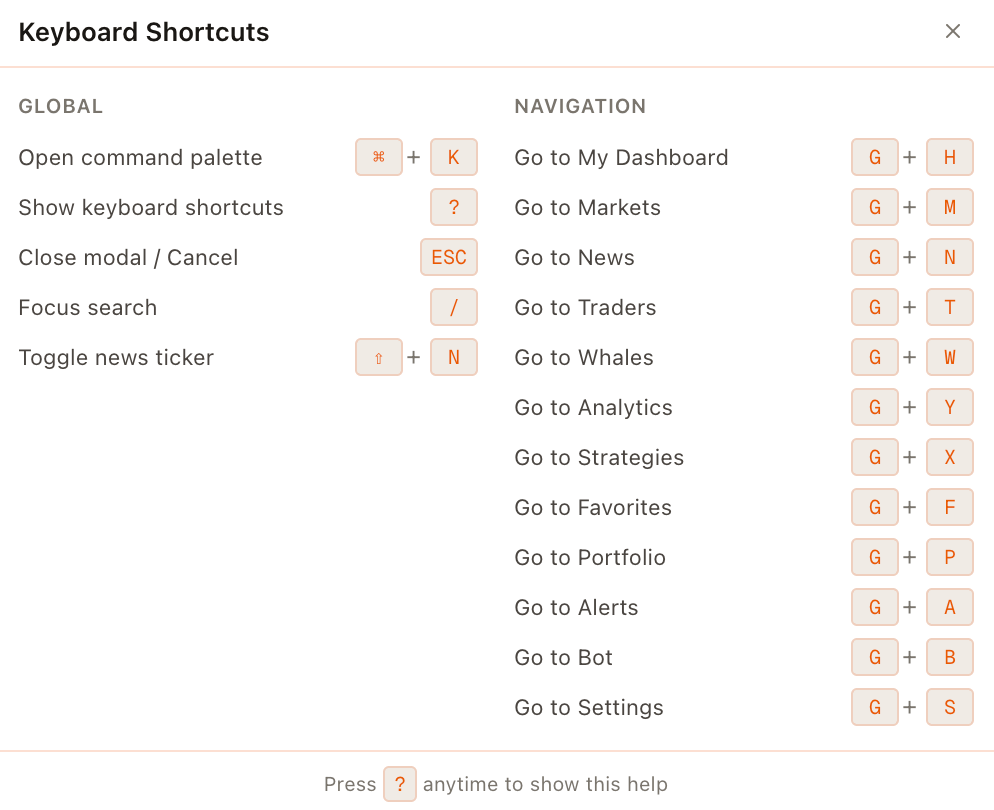
The terminal UI displays built-in navigation shortcuts for switching between modules.
A Notifications panel is exposed with the Alt+T shortcut label in the footer area.
Global navigation shortcuts (as displayed)
| Shortcut | Destination |
|---|---|
| G H | My Dash (Dashboard) |
| G T | Trade |
| G N | News |
| G Y | Analytics |
| G B | Community |
| G S | Settings |
| Alt+T | Notifications |
 |
|
| ## Market search shortcut (as displayed) | |
| The header shows a ⌘K hint next to "Search markets…", indicating a command-palette style market search. |
Help shortcut
The Settings page shows a "?" shortcut for accessing the keyboard shortcuts list.